Event Notification Centre
A personalised, real-time intelligence feed. PSN's data engine continuously scans contracts, tenders, organisational changes and market activity, then matches each event against your defined interests so you stay ahead without searching manually.
- 1Open EventsSidebar → Events → Notifications.
- 2Click + New AlertTop-right of Alert Delivery.
- 3Tick 2 event typesNEW_TENDER and COMPETITOR_CONTRACT_AWARD.
- 4SaveEmail yourself — done.
Read the Event Activity Feed
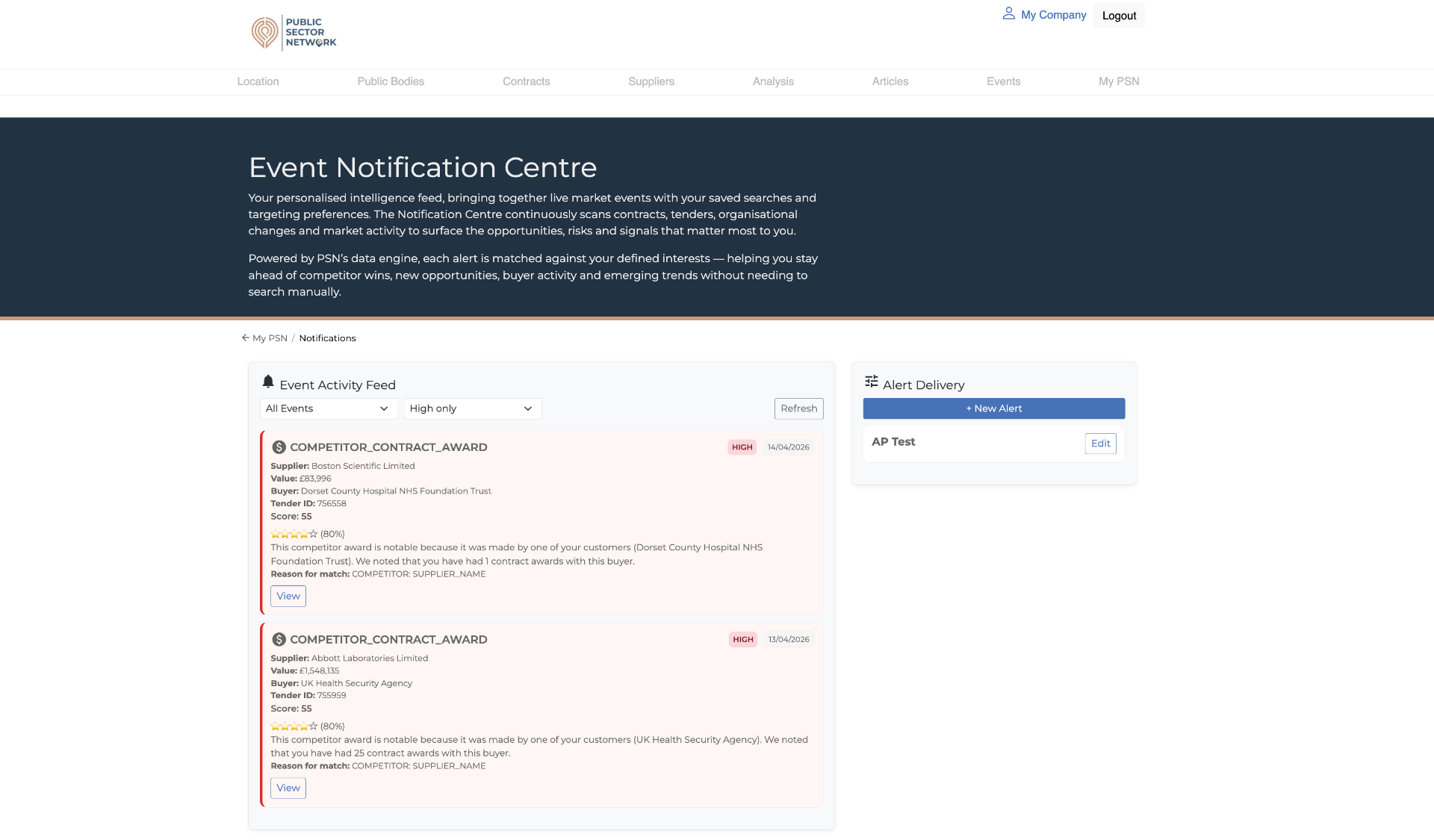
Every match arrives as a card with its own match score and reason. Use the dropdowns to filter by type or importance.
 1234
1234- 1Filter dropdownsAll Events + importance level — start broad, then narrow.
- 2RefreshPulls the latest matches without reloading the page.
- 3Importance + dateHIGH/MEDIUM/LOW badge plus when the event happened.
- 4View actionOpens the full event with buyer, value, score and reason.
Each card tells you everything you need to triage in one glance: who (supplier/buyer), how big (value), how confident the match is (score), and why it matched your interests.
A match score above 70% is usually worth investigating. Below that, treat it as background noise unless your market is very narrow.
Create and tune your alert
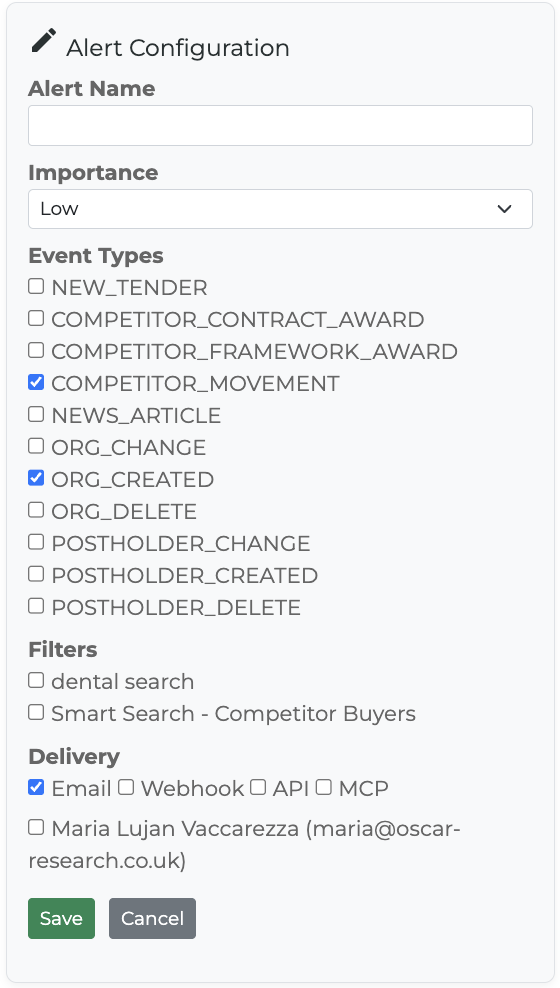
Pick the events that matter, narrow with filters, and choose how strong the signal needs to be.
 12345
12345- 1Alert NameUse a recognisable name like 'NHS tenders – South' so teammates know what it is.
- 2ImportanceThreshold for how strong a match must be to land in your feed/inbox.
- 3Event TypesTick the categories you want — see glossary below for what each means.
- 4FiltersOptional: narrow to specific saved searches, sectors or smart lists.
- 5DeliveryEmail / Webhook / API / MCP plus the named recipients.
Event Types glossary
Importance levels
| Level | What you'll see | Best for |
|---|---|---|
| Low | Everything that matches — high noise, complete coverage. | Research mode, mapping a new market. |
| Medium | Sensible default — strong matches only. | Day-to-day account management. |
| High | Only the strongest, revenue-critical signals. | Executives or busy sales leaders. |
Choose how it's delivered
Send alerts where your team will actually see them.
Personal inbox digest. Best for sales reps and account managers.
Webhook
POST events to a URL you control. Best for Slack, Teams or custom workflows.
API
Pull matched events via the published endpoint. Best for CRM/BI integrations.
MCP
Stream events into AI assistants via the MCP protocol.